Artificial Intelligence (AI) Resources

UIC Statement on Use of Generative AI
intro
1
Artificial Intelligence is quickly transforming the computing landscape and already has or will impact the way each of us uses technology.
2
While we in Technology Solutions are always cautious to ensure acceptable use of all new technology from a security, accessibility, and fiscal perspective, we want to share and encourage use of currently supported offerings to the campus. As always, our focus on enhancing teaching and learning, fostering groundbreaking research endeavors, and driving innovation in business applications, guides this lineup of AI tools for your benefit.
Blackboard Ultra
1

Blackboard Ultra
2
Blackboard Ultra
The recently launched Blackboard AI Design Assistant is a robust toolkit that supports instructors in the development and design of course content. Created through collaboration with Microsoft, this innovative tool brings forth multiple functionalities facilitated by Generative AI within Blackboard Learn Ultra courses. These functionalities encompass sourcing course images from Unsplash, providing assignment rubric suggestions, suggesting quiz questions based on available content, and constructing learning modules from a specified list, such as textbook chapters or information from the syllabus, covered in the course. Soon to be introduced is the Authentic Assessments feature, enabling faculty to generate discussions and journals rooted in course content, aligned with diverse levels of choice within Bloom’s taxonomy. This tool is available to faculty and staff for course development purposes.
Microsoft Copilot
1
Microsoft 365 Copilot
This powerful tool leverages state-of-the-art AI capabilities to assist users with their daily tasks while adhering to stringent security protocols. Microsoft 365 Copilot is the only currently approved Generative AI (GenAI) environment for use with non-public university data.
Copilot is designed to enhance productivity and streamline various tasks within the Microsoft 365 environment. It provides both a chat interface (such as ChatGPT/DALL-E) as well as unique integrations into Microsoft applications, such as Outlook, Teams, and many Office apps. General information on the product may be found at Microsoft 365 Copilot.
This tool is available to Faculty and Staff; it is not available to students. Licenses can be purchased at the WebStore.
2

Microsoft Copilot
Box AI
1
Box AI
2
Box AI
(coming soon, currently in limited beta)
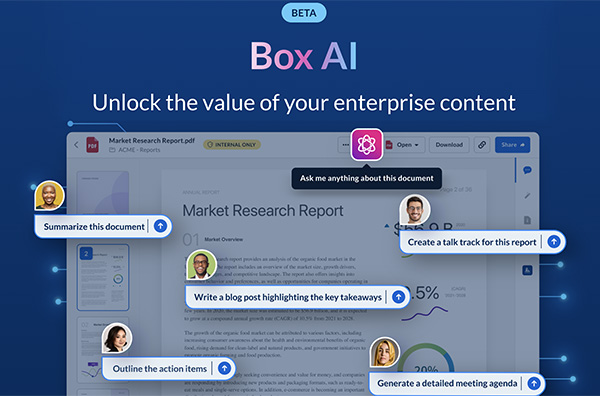
Box AI (coming soon, currently in limited beta): This spring, we will introduce Box AI, a solution designed specifically to provide the power of ChatGPT and similar models with the security of Box. Users have access to use the AI prompt and interact securely with all their data stored in Box. All data stored in Box may be used with this tool. Protected Health Information (ePHI) should be stored in Box Health Data Folders. This tool will be available to all users with UIC Box accounts.
Grammarly
1
Grammarly
The Learning Technology Solutions team in Technology Solutions is pleased to include Grammarly in our array of resources designed to enhance written communication skills across diverse disciplines. Our goal is to promote equity by providing a 24/7 writing resource on a secure platform. In addition to offering grammar support, style enhancement, spell checking, and plagiarism checking, Grammarly’s Writing Assistant, fueled by AI, offers corrections and suggestions. This can assist users in crafting clear and concise documents and help students further develop their personal style of writing. The My Grammarly cloud will be turned off, so all content should be contained in university provided storage. This application is available to all Students, Faculty and Staff.
2

Grammarly
LinkedIn Learning Resources & AI-Powered Career Coach
1

LinkedIn Learning Resources & AI-Powered Career Coach
2
LinkedIn Learning Resources & AI-Powered Career Coach
To support your professional growth journey effectively, we provide access to LinkedIn Learning resources, which include significant learning paths related to AI. LinkedIn Learning also provides an intelligent career coach powered by AI algorithms — helping you make informed decisions regarding your career path based on personalized recommendations. This tool is available to all faculty, staff, and students.
Adobe Creative Cloud
1
Adobe Creative Cloud
Adobe Express and Adobe Firefly are available to all faculty and staff and provide robust generative AI tools for creative needs. No sensitive or high-risk data is permissible in this environment. This tool is available to all Faculty and Staff, as well as students who have purchased Creative Cloud licenses.
2

Adobe Creative Cloud
Zoom AI Companion
1
Zoom AI Companion
2
Zoom AI Companion
Following a complete security review, all users with UIC licensed Zoom accounts have access to Zoom AI Companion, with the exception of members of a PHI group. This tool provides in-meeting digital assistance and post-meeting notes and recaps. Some features of Zoom AI Companion may be limited due to our HIPAA-secured environment, but Zoom continues to work on full feature parity and will release updates regularly. Information on appropriate use of data in this tool will be provided upon rollout. This tool will be available to Faculty and Staff with full Zoom licenses.
Extra Offerings
1
AI Workshops
We understand that making resources available addresses only one piece of this puzzle. Creating awareness of such tools and providing training are equally important. In 2024, LTS will be offering customized workshops designed for the integration of Generative AI applications in educational settings. These workshops will emphasize hands-on experiences, concentrating on the practical implementation of Generative AI within a college or department, and focus on utilizing Generative AI to enhance communication, foster student engagement, design lessons, and generate content effectively.
2
Research Support
Also, as part of its Spring 2024 training program, ACER will be conducting two workshops titled ‘AI 101’. These workshops will introduce the UIC community to GenAI tools and techniques by providing shared language and understanding of GenAI functionality, demonstrating practical insights of its applications, and mastering effective prompting techniques. This will be a low code or no-code introduction to GenAI. Moreover, we’ll explore the available GenAI tools at UIC and how to seamlessly utilize them to improve productivity.
Closing
1
As with all emerging technologies, AI changes constantly. Today, it is a tool that can augment and support many of your workflows, but we encourage you to use with caution and validate all its outputs. UIC does not control or see any of the specific answers and can’t guarantee accuracy from the tools. If you encounter significant unexpected or problematic response, please share your experience with security@uic.edu.
2
We are thrilled to bring these AI offerings to our campus community. Each tool mentioned has its own unique features and security measures in place, ensuring a safe and productive environment for all users. We want to partner and support your needs. If you have any questions or want to share your ideas, please do not hesitate to reach out.
The UIC AI Advisory Group
UIC AI Advisory Group comprises faculty and staff representing all areas of campus. The group is broken up into subgroups focusing on disciplines of their expertise: teaching & learning, research, healthcare, and administrative operations. Each group will work collaboratively to develop principles and strategic goals in service of university-wide conversations about the role of AI at UIC and the needs associated with supporting our students, faculty and staff.